
Powerful Nintendo 3DS Custom Firmware
Experience advanced customization, homebrew support, and enhanced gaming with Luma3DS. Take full control of your console with powerful features designed for performance, flexibility, and freedom.
Features
Explore the powerful features of Luma3DS that enhance your Nintendo 3DS experience. From homebrew support to advanced system customization, everything you need is built-in.
System Customization
Easily modify your system settings and unlock hidden capabilities of your Nintendo 3DS.
Region-Free Gaming
Play games from any region without restrictions or compatibility issues.
Game Patching
Apply custom patches and mods to your games using LayeredFS support.
Plugin Support
Use 3GX plugins to enable cheats, enhancements, and custom in-game features.
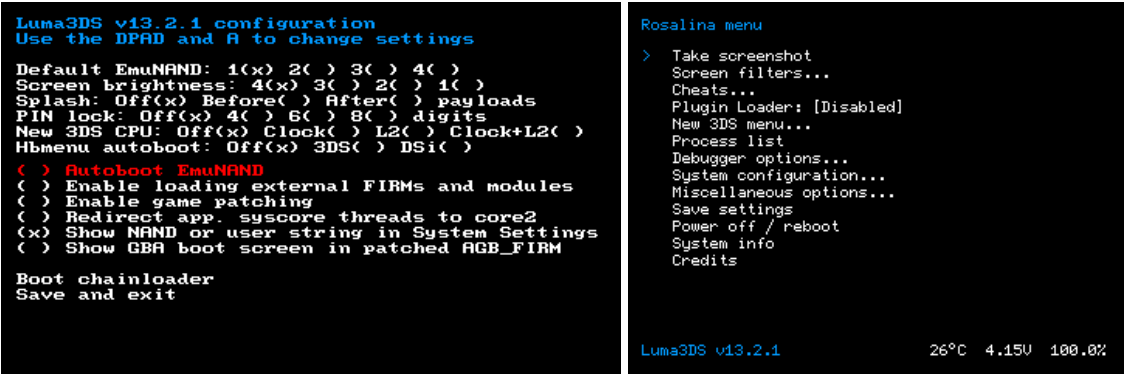
Rosalina Menu
Access a powerful in-game menu for screenshots, cheats, and system tools anytime.
Performance Monitoring
Track system performance and manage processes efficiently.
Homebrew Launcher
Run custom applications and tools developed by the community.
Debugging Tools
Advanced tools for developers including logging and debugging support.
Signature Patching
Install and run unsigned applications without limitations.
Game Optimization
Improve performance and stability for a smoother gaming experience.
Screen Filters
Protect your eyes with built-in blue light and screen adjustment options.
Custom Firmware Updates
Stay up to date with the latest features and improvements from the Luma3DS team.
About
Luma3DS is a powerful and reliable custom firmware for the Nintendo 3DS, designed to unlock advanced features and remove system limitations. It allows users to run homebrew applications, customize their system, and enhance their overall gaming experience with ease. With an active community and continuous updates, Luma3DS ensures stability, performance, and flexibility for both casual users and developers.
Why Choose Luma3DS
Luma3DS stands out as one of the most powerful and stable custom firmware solutions for Nintendo 3DS. It provides advanced features, seamless performance, and full control over your device.
FAQS
Find answers to the most common questions about Luma3DS, including installation, features, and usage.
Luma3DS is a custom firmware (CFW) for the Nintendo 3DS system that enhances the console’s features and performance beyond the official software.
It is mainly used to run homebrew applications, customize system settings, and improve compatibility with games and system functions. Luma3DS also helps bypass certain system restrictions, allowing advanced users to modify and extend their 3DS experience safely.
Luma3DS is generally considered safe when it is installed correctly and downloaded from trusted sources.
It is a widely used custom firmware in the Nintendo 3DS community and has been actively used for homebrew and system customization for years. However, since it modifies the system software, there are some important risks to understand:
In short, Luma3DS is safe for customization and homebrew use when installed properly, but it should always be downloaded from trusted sources and used carefully.
Luma3DS does not require advanced technical knowledge, but you do need to carefully follow step-by-step instructions.
The installation process is guided and beginner-friendly, but it involves system-level changes, so attention is important. Most users with basic computer skills can install it successfully by following an official guide.
In short, no advanced coding or technical expertise is required, but careful reading and following instructions is necessary to avoid mistakes.
Yes, Luma3DS allows you to play games from any region on your Nintendo 3DS system.
It removes the built-in region lock, which normally prevents games from one region (for example Japan or Europe) from running on a console from another region. With Luma3DS installed, you can run imported or foreign-region game cartridges and digital games without needing any additional modifications.
This makes it easier to access a wider game library and play titles that are not officially released in your region, all on the same device.
Homebrew support on Nintendo 3DS refers to the ability to run unofficial, community-developed software on the system using custom firmware like Luma3DS.
It allows users to install and use applications that are not available on the official Nintendo eShop, such as emulators, utilities, file managers, and system tools. This gives more flexibility and control over the console beyond its original restrictions.
Installing Luma3DS does not damage your Nintendo 3DS when it is done correctly by following a proper and trusted guide.
Luma3DS is a custom firmware that runs on top of the system and does not modify the hardware itself. In normal use, it is widely considered safe and is used by many users for features like region-free gaming and homebrew support.
However, like any system modification, there is a small risk if the installation process is done incorrectly, such as skipping steps, using outdated files, or interrupting system setup. Following official and up-to-date instructions minimizes these risks and keeps the device stable and fully usable.
Yes, you can safely update your Nintendo 3DS system after installing Luma3DS.
Luma3DS is designed to support official system updates from Nintendo and is generally compatible with the latest firmware versions. Updating your system does not remove Luma3DS or its features, as long as you are using a properly installed and up-to-date version of the custom firmware. In some cases, you may need to update Luma3DS itself to match the latest system update, but this is a simple process and usually required only when a major firmware update is released.
Luma3DS supports the use of cheats and certain game modifications through its built-in debugging and patching features.
It allows users to apply game patches, enable cheat codes, and use additional tools via compatible homebrew applications. This can include gameplay tweaks, unlocks, or custom modifications depending on the game and available cheat databases or plugins. However, support is not automatic for all games, and cheats or mods usually require additional homebrew tools or external files to function properly.
Yes, Luma3DS is completely free to use.
It is an open-source custom firmware developed and maintained by the community, and it does not require any payment or subscription. Users can download and install it at no cost to unlock features like homebrew support, region-free gaming, and system customization on the Nintendo 3DS.
Since it is community-driven software, it is freely available online and regularly updated without any licensing fees.
You can get official Luma3DS support and updates from here, where the developers publish the latest releases, changelogs, and installation files.
For help and troubleshooting, users usually rely on community support forums such as GBAtemp and Reddit’s 3DS homebrew communities, where experienced users share solutions, guides, and updates. In most cases, updating Luma3DS is done by downloading the latest release from GitHub and replacing the boot.firm file on your SD card, or using trusted homebrew tools like Universal Updater.
Blog
Explore the latest guides, tips, and updates about Luma3DS to enhance your Nintendo 3DS experience.